2. Overview
LAMMPS-GUI is a graphical text editor customized for editing LAMMPS input files. It uses the LAMMPS C-language library interface and thus can run LAMMPS directly using the contents of the editor’s text buffer. It can retrieve and display information from LAMMPS while it is running, display visualizations created with the dump image command, and is adapted specifically for editing LAMMPS input files through syntax highlighting, text completion, and reformatting, and linking to the online LAMMPS documentation for known LAMMPS commands and styles.
LAMMPS-GUI aims to support a workflow similar to the traditional experience of running LAMMPS using a text editor, a command-line window, launching the LAMMPS text-mode executable printing output to the screen, and post-processing and visualizing LAMMPS’ output but just integrated into a single application.
LAMMPS-GUI integrates well with graphical desktop environments where the
.lmp filename extension can be registered with LAMMPS-GUI as the
executable to launch when double-clicking on such files using a file
manager. LAMMPS-GUI will launch and read the file into its buffer.
Input files can also be dropped into the editor window of the running
LAMMPS-GUI application, which will close the current file and open the
new file.
LAMMPS-GUI makes it easier for beginners to get started running LAMMPS and is well-suited for LAMMPS tutorials, since you only need to work with a single, ready-to-use program for most of the tasks. It is available for download as a pre-compiled package for popular operating systems (Linux, macOS, Windows). This saves time and allows users to focus on learning LAMMPS itself, without the need to learn how to compile LAMMPS, learn how to use the command line, or learn how to use a separate text editor, plotting or visualization program.
The tutorials at https://lammpstutorials.github.io/ are specifically designed for use with LAMMPS-GUI. Their tutorial materials can be downloaded and edited directly from within the GUI while automatically loading the matching tutorial instructions into a web browser.
While making it easy for beginners to get started with LAMMPS, it is expected that LAMMPS-GUI users will eventually transition to workflows that most experienced LAMMPS users employ. That traditional procedure is effective for people proficient in using the command line, as it allows them to use the tools for the individual steps that they are most comfortable with. In fact, it is often required to adopt this workflow when running LAMMPS simulations on high-performance computing facilities.
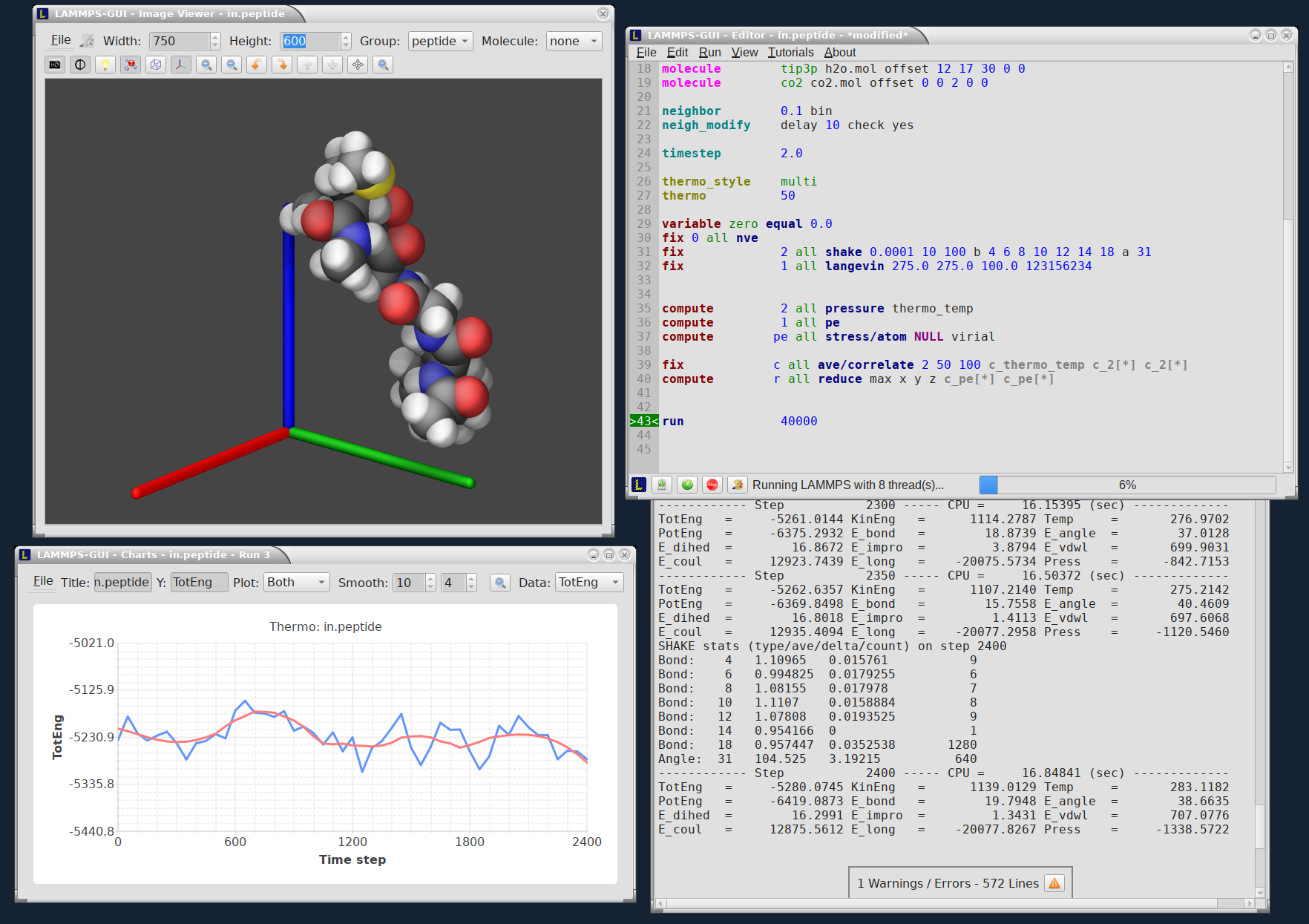
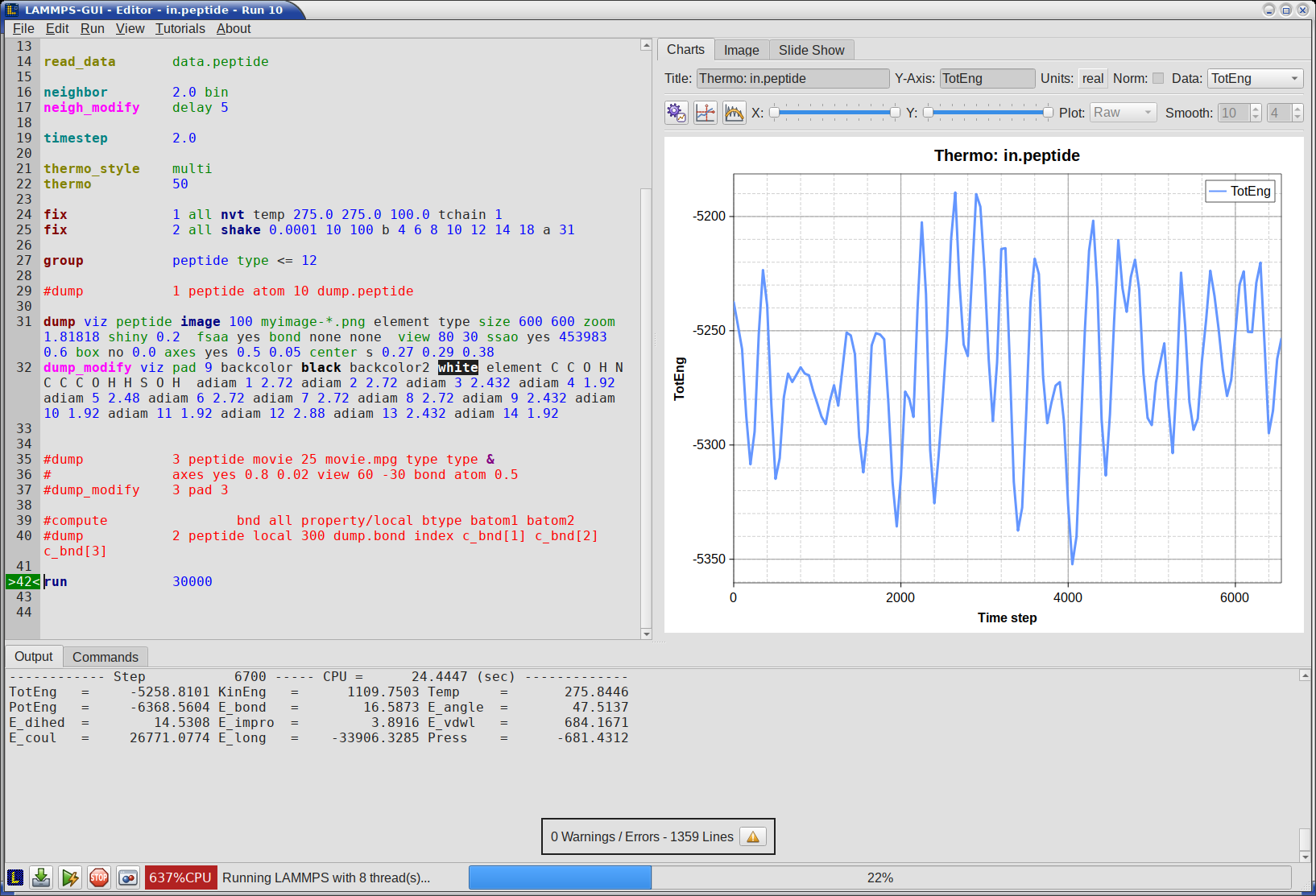
Most features in LAMMPS-GUI have been exposed to keyboard shortcuts, making it also appealing for experienced LAMMPS users for prototyping and testing simulation setups.
LAMMPS-GUI Key Features
A detailed discussion and explanation of all features and functionality are in the following pages. Here are a few highlights of LAMMPS-GUI:
Individual windows or combined window viewing modes
Text editor with line numbers, syntax highlighting, and find & replace, customized for LAMMPS
Text editor features command completion and indentation for known commands and styles
Input validation with a static pre-run check of the input script and a dry-run mode that executes only the setup phase of each command
Switch its working directory to the folder of the file in the buffer
Indicator for currently executed command and line that caused an error
Progress bar indicates how far a run command has completed and how the CPUs are utilized
Context-sensitive help for LAMMPS commands via the online documentation
Auto-adapting to features and packages available in the LAMMPS library in use
LAMMPS is running in a concurrent thread, so the GUI remains responsive
LAMMPS can be started and stopped with a mouse click or a hotkey
Screen output is captured in an Output window
Many adjustable settings and preferences are persistent, including the 5 most recent files
Thermodynamic output is captured and displayed as a line graph in a Charts window
Export of thermodynamic data to CSV, YAML, and multi-column text format
Create simple plots from imported CSV, YAML, and plain multi-column data
Multiple post-processing options for plot data, and plot style customizations
Interactive visualization of current state via calling dump image
Capture of images created by dump image in the Slide Show window
Export of Slide Show animations to movie files, or images to arbitrary formats
Dialog to set variables, similar to the LAMMPS command-line flag ‘-v’ / ‘-var’
Support for GPU, INTEL, KOKKOS/OpenMP, OPENMP, and OPT accelerator packages
Inspection of binary restart files created by LAMMPS
View text, image, and animation/movie files
Integration with LAMMPS tutorials
Command prompt window for issuing shell commands with Tab completion for commands and filenames, scrollable history and aliases
Update dynamically loaded LAMMPS library from LAMMPS download server