1. Installation
LAMMPS-GUI is distributed as source code on GitHub and can be compiled as part of compiling LAMMPS, where it will be linked to the corresponding version of LAMMPS directly. Pre-compiled packages of LAMMPS with LAMMPS-GUI included are available for download (see below).
LAMMPS-GUI can also be compiled as a standalone package that loads the LAMMPS library dynamically at runtime. This enables using LAMMPS-GUI with customized, patched, or extended LAMMPS versions containing features not available in the official LAMMPS distribution packages. It also allows using LAMMPS-GUI with LAMMPS shared libraries compiled using the traditional makefile based build process (which does not support compiling LAMMPS-GUI directly). Pre-compiled packages of standalone LAMMPS-GUI versions with a LAMMPS shared library included are also available for download (see below).
1.1. Prerequisites and portability
LAMMPS-GUI is programmed in C++ based on the C++17 standard and using the Qt GUI framework. As of LAMMPS-GUI version 2.0.0 Qt version 6.2 or later is required. LAMMPS-GUI can switch between a “light” and a “dark” theme according to the settings of the desktop environment. Building LAMMPS-GUI from source requires CMake version 3.20 or later and a suitable C++ compiler.
LAMMPS-GUI 3.1.0 has been successfully compiled and tested on:
Ubuntu Linux 22.04LTS x86_64 using GCC 11, Qt version 6.2
Ubuntu Linux 24.04LTS x86_64 using GCC 13, Qt version 6.4
AlmaLinux 9.8 x86_64 using GCC 11, Qt version 6.6
Fedora Linux 43 x86_64 using Clang 21, Qt version 6.10
Fedora Linux 43 x86_64 using GCC 15, Qt version 6.10
Apple macOS 12 (Monterey) with Xcode 14.2 / AppleClang 14 on arm64 and x86_64, Qt version 6.5
Apple macOS 14 (Sonoma) with Xcode 16.4 / AppleClang 17 on arm64, Qt version 6.8
Windows Server 2025 x86_64 with Visual Studio 2022 and Visual C++ 14.40, Qt version 6.8
Windows 11 x86_64 with Visual Studio 2026 and Visual C++ 14.50, Qt version 6.10
Windows 11 x86_64 with MinGW / GCC 15.2 cross-compiler on Fedora 43, Qt version 6.10
1.2. Pre-compiled executables
1.2.1. Packages including a full LAMMPS version
For many users and especially for beginners learning to use LAMMPS, it is most convenient to install and use one of the pre-compiled packages that include both LAMMPS-GUI and the command-line version of LAMMPS. In these packages LAMMPS-GUI is linked directly to the included LAMMPS library and thus it cannot be changed in the LAMMPS-GUI preferences dialog. Such pre-compiled LAMMPS executable packages are available for download for Linux x86_64 (Red Hat Enterprise Linux 9.x or Ubuntu 22.04LTS or later and compatible), macOS (version 12 aka Monterey or later), and Windows (version 10 or later) from the LAMMPS releases page on GitHub. A backup download location is at https://download.lammps.org/static/ but may not always be up-to-date. Occasionally, also test version packages previewing recently added features are available at https://download.lammps.org/testing/ .
1.2.2. Standalone packages with a basic LAMMPS library
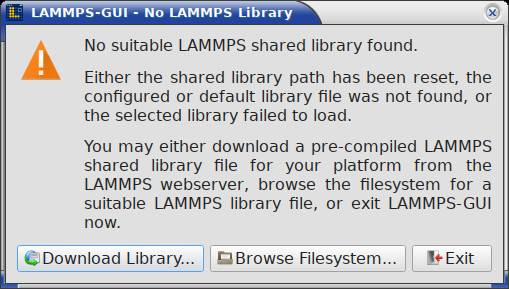
LAMMPS-GUI packages containing only LAMMPS-GUI compiled in plugin mode are available from the LAMMPS-GUI releases page on GitHub. Most of these packages include a LAMMPS shared library with some subset of LAMMPS’ features that do not depend on additional libraries for improved portability.
If you want to override that choice of LAMMPS library, you can use the
-p command line flag to tell LAMMPS-GUI which other LAMMPS shared
library file you want it to load. By using -p "" you can also reset
any previous choice and thus trigger loading the default library again.
When resetting the LAMMPS shared library path or when the currently
configured library file cannot be loaded or no longer exists, a dialog
will appear that lets you re-download the default minimal LAMMPS shared
library from the LAMMPS web server or browse the file system for a
suitable custom shared library file. Once LAMMPS-GUI is running, you
can also change the path to the LAMMPS shared library or re-download a
pre-compiled copy from the Preferences dialog.
The flatpak version of the standalone LAMMPS-GUI package does not
contain a pre-compiled library so it will directly show the download
or browse dialog on the first invocation. When the flatpak version
is updated, it may be required to reset the shared library location
with -p "" and re-download the latest version.
Changed in version 3.1: The minimum LAMMPS version required by LAMMPS-GUI is now 2 September 2026
1.2.3. GPU support and MPI parallelization
The pre-compiled packages include a LAMMPS version with support for GPUs through the GPU package using OpenCL in mixed precision. However, this requires that you have a compatible driver and the OpenCL runtime installed. This is not always available, and when using the LAMMPS flatpak bundle, the flatpak sandbox usually prevents accessing the GPU and thus the GPU package is disabled for that version. GPU support through the KOKKOS package is currently not available for technical reasons, but serial and OpenMP multi-threading use of KOKKOS is available.
The design decisions for LAMMPS-GUI and how it launches LAMMPS conflict with parallel runs using MPI. You have to use a regular LAMMPS executable compiled with MPI support for that. For the use cases that LAMMPS-GUI has been conceived for (learning LAMMPS, testing or debugging LAMMPS inputs, prototyping new projects or complex workflows), this is not a significant limitation. Many supercomputing centers and high-performance computing clusters have parallel LAMMPS pre-installed.
1.2.4. Platform notes
Windows 10 and later
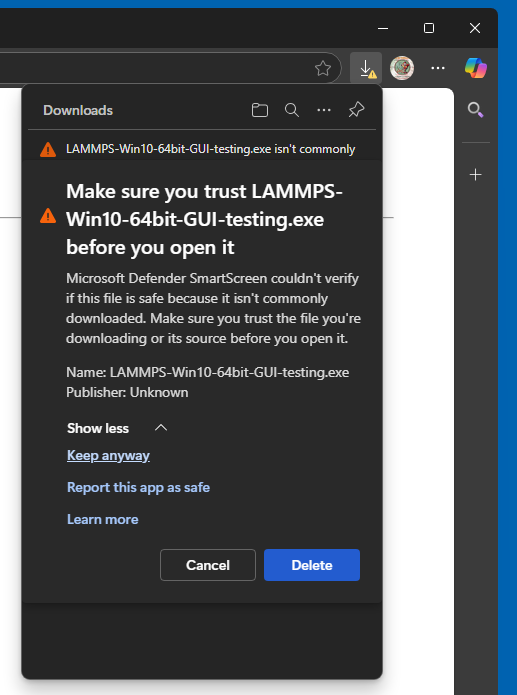
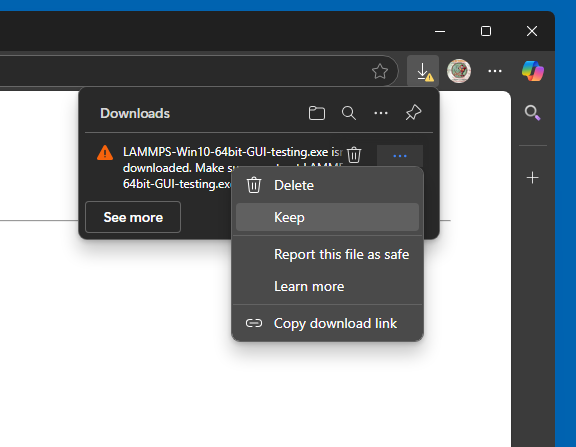
After downloading either the LAMMPS-Win10-64bit-GUI-<LAMMPS
version>.exe or the LAMMPS-GUI-Win10-x86_64-<LAMMPS-GUI
version>.exe installer package, you need to execute it, and start the
installation process. Depending on your security settings of your web
browser, you may have to explicitly tell it to download the file and
then confirm twice to keep the downloaded file despite the claims
that it may be dangerous and insecure. The main reason for that is that
one needs to pay for being a registered developer and obtain a
corresponding cryptographic signature to sign the binaries with.
Managing Microsoft Defender SmartScreen protection
Since LAMMPS-GUI version 3.0.5 the Windows installer packages and the included executables are cryptographically signed with a self-signed certificate. You now have two options:
Option A: just ignore the warnings
When the message “Windows protected your PC” appears, click More info, and then Run anyway. You may also have to enable “Developer Mode” in the Windows System Settings to be able to run the installer. Using a cryptographic signature still guarantees the file has not been modified since we built it, so you have that extra protection. This may be needed since these installer packages sometimes cause false positives with anti-virus software and are reported as containing a trojan
Option B: install and trust our self-signed certificate
You can download our self-signed public certificate from
https://download.lammps.org/lammps-gui/LAMMPS-GUI.cer (The SHA-256
hash of this file is
2a90ba8d0d3406fba6d67e6edb3f4904b1684756abf777bd2c58464ab1dff2cd) and
then open a “Command Prompt” with Administrator permissions. At
the prompt you run the following two commands to import and trust the
certificate.
certutil -addstore Root LAMMPS-GUI.cer
certutil -addstore TrustedPublisher LAMMPS-GUI.cer
Security note: Adding a certificate to the Root store means your computer will trust anything signed with the matching private key. Only install certificates from publishers you trust, obtained over HTTPS from their official site.
If you ever wish to remove this certificate, you can do it with the following commands.
certutil -delstore Root "The LAMMPS Developers"
certutil -delstore TrustedPublisher "The LAMMPS Developers"
MacOS 12 and later
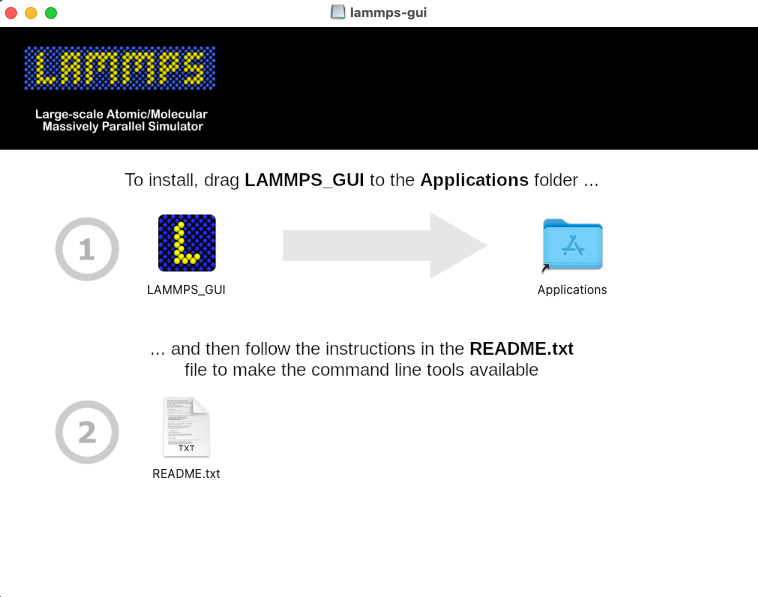
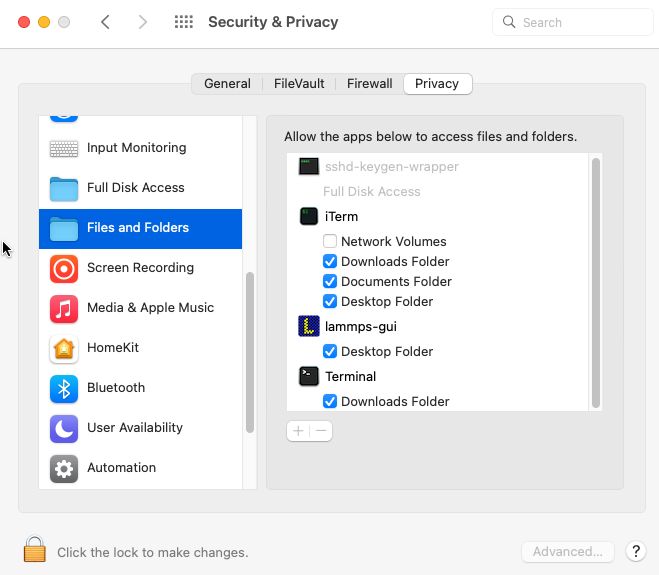
After downloading the LAMMPS-macOS-multiarch-GUI-<LAMMPS version>.dmg
or LAMMPS-GUI-multiarch-<LAMMPS-GUI version>.dmg application bundle disk
image, you need to double-click it and then – in the window that opens –
drag the app bundle as indicated into the “Applications” folder. Afterwards,
the disk image can be unmounted or ejected. Then follow the instructions in
the “README.txt” file to get access to the other included command-line
executables, if desired.
Linux on x86_64
For Linux with x86_64 CPU there are currently two variants of pre-compiled LAMMPS-GUI: 1) a tar file with binaries and a wrapper script and 2) a flatpak bundle. The first is currently compiled on AlmaLinux 9.8 or Ubuntu 22.04LTS (the oldest popular Linux distributions that provide the required C++17 compatibility out of the box and thus have the best chance that the pre-compiled binaries will also run on more recent Linux installations) and depends on the backward compatibility of the core libraries between different releases on Linux distributions. The second uses the flatpak sandbox environment to maintain binary compatibility across platforms; this uses a more recent build environment and Qt library release than the tar archive.
Linux binary tarball
After downloading and unpacking the
LAMMPS-Linux-x86_64-GUI-<LAMMPS version>.tar.gz or the
LAMMPS-GUI-Linux-x86_64-<LAMMPS-GUI version>.tar.gz package,
you can switch into the “LAMMPS_GUI” folder and execute
“./lammps-gui” directly:
$ cd ~/Downloads
$ tar -xzvvf LAMMPS-Linux-x86_64-GUI-30Mar2026.tar.gz
$ cd LAMMPS_GUI
$ ./lammps-gui &
The LAMMPS_GUI folder may also be moved around and added to the
PATH environment variable so the executables will be found
automatically.
Installing required compatibility packages
Since software is constantly evolving, it may be required to install additional software packages for your Linux distribution to achieve compatibility with binaries compiled on older distributions. Using the flatpak bundle (see below) avoids these kind of issues by compiling and running the application in a standardized sandbox which is maintained by the flatpak software manager.
Linux flatpak bundle
The second Linux package variant uses flatpak software deployment
environment and requires the flatpak management
and runtime software to be installed. As with the binary tarball, there
are two bundle variants: LAMMPS-Linux-x86_64-GUI-<LAMMPS version>.flatpak
is built in the LAMMPS repository in linked mode and includes the LAMMPS
console executable, while LAMMPS-GUI-Linux-x86_64-<LAMMPS-GUI version>.flatpak
is built in the LAMMPS-GUI repository in plugin mode. After downloading
either bundle, you can install it with:
$ cd ~/Downloads
$ flatpak install --user LAMMPS-Linux-x86_64-GUI-<version>.flatpak
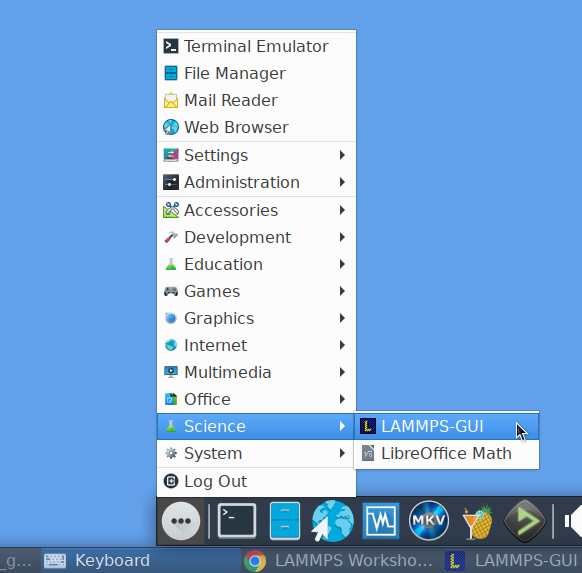
After installation, LAMMPS-GUI should be integrated into your desktop
environment under “Applications > Science” but also can be launched from
the console with flatpak run org.lammps.lammps-gui. The flatpak
bundle also includes the console LAMMPS executable lmp which can be
launched to run simulations with, for example with:
flatpak run --command=lmp org.lammps.lammps-gui -in in.melt
Other bundled command-line executables are run the same way and can be listed with:
ls $(flatpak info --show-location org.lammps.lammps-gui)/files/bin
1.3. Compilation from source
History
The source for LAMMPS-GUI was included with the LAMMPS source code
distribution until LAMMPS version 22 July 2025 in the folder
tools/lammps-gui. Starting with LAMMPS-GUI version 1.8.0 and
LAMMPS version 10 September 2025 the LAMMPS-GUI sources are
distributed separately through its own git repository at
https://github.com/lammps/lammps-gui.
LAMMPS-GUI can be built as part of a regular LAMMPS compilation. It
will be automatically downloaded from its git repository and configured.
This is usually the most convenient way to compile and install it.
Since CMake is required
to build LAMMPS-GUI, you need to build LAMMPS with CMake as well. To
enable its compilation during compiling LAMMPS, the CMake variable -D
BUILD_LAMMPS_GUI=on must be set when creating the CMake configuration.
All other settings (compiler, flags, compile type) for LAMMPS-GUI are
then inherited from the regular LAMMPS build. If the Qt library is
installed as packaged for Linux distributions, then its location is
typically auto-detected since the required CMake configuration files are
stored in a location where CMake can find them without additional help.
Otherwise, the location of the Qt library installation must be indicated
by setting -D Qt6_DIR=/path/to/qt6/lib/cmake/Qt6, which is a path to
a folder inside the Qt installation that contains the file
Qt6Config.cmake.
The charts display is drawn by a self-contained native renderer
(PlotWidget) built only on Qt Widgets and QPainter, so the
build no longer depends on the Qt Charts or Qt Graphs modules. No extra
CMake settings are required to select a chart backend.
The toolbar and menu icons are bundled in SVG format, so building and
running LAMMPS-GUI also requires the Qt Svg module, which provides the
SVG icon engine that Qt uses to render them. On Linux distributions this
module is often packaged separately from the Qt base libraries (for
example the qt6-svg-dev development package, which pulls in the
libqt6svg6 runtime, on Debian and Ubuntu). The CMake configuration
requires it, and if the module – or, at run time, its icon-engine plugin
– is missing, the icons render blank. The pre-compiled packages and
installers already bundle it.
1.3.1. LAMMPS-GUI plugin version
It is possible to compile a standalone LAMMPS-GUI executable (e.g. when
LAMMPS has been compiled with traditional make). Rather than linking to
the LAMMPS library during compilation, it includes a plugin loader that will
load a LAMMPS shared library file dynamically at runtime during the
start of the GUI; e.g. liblammps.so.0 or liblammps.0.dylib or
liblammps.dll (depending on the operating system). This has the
advantage that the LAMMPS library can be built from updated or modified
LAMMPS source without having to (re-)compile the GUI.
The ABI of the LAMMPS C-library interface is very stable and generally
backward compatible. However, features used in LAMMPS-GUI may require a
minimum LAMMPS version of the library. LAMMPS-GUI will print a suitable
error message and exit if an incompatible LAMMPS library is loaded. You
can override the path to the LAMMPS library with the -p <path> or
--pluginpath <path> command-line flag. This is usually
auto-detected on the first run and can be changed in the LAMMPS-GUI
Preferences dialog. The command-line flag lets you reset this path
to a valid value in case the original setting has become invalid. An
empty path (“”) as argument restores the default setting.
It is also possible to link the standalone compiled LAMMPS-GUI version
to the LAMMPS library directly. This feature is enabled by setting -D
LAMMPS_GUI_USE_PLUGIN=off (default setting is on). This is also the
setting for compilation within LAMMPS. In this case, the CMake
configuration needs to be told where to find the LAMMPS headers and the
LAMMPS library, via -D LAMMPS_SOURCE_DIR=/path/to/lammps/src and
-D LAMMPS_LIBRARY=/path/to/liblammps/file.
1.3.2. Platform notes
macOS
When building on macOS, the build procedure will try to create a
drag-n-drop installer, LAMMPS-GUI-macOS-multiarch-<version>.dmg,
when using the ‘dmg’ target (i.e. cmake --build <build dir> --target
dmg or make dmg).
To build multi-arch executables on macOS that will run on both, arm64
and x86_64 architectures natively, it is necessary to set the CMake
variable -D CMAKE_OSX_ARCHITECTURES=arm64;x86_64. To achieve wide
compatibility with different macOS versions, you can also set -D
CMAKE_OSX_DEPLOYMENT_TARGET=12.0 which will set compatibility to macOS
12 (Monterey) and later, even if you are compiling on a more recent
macOS version. These are the settings currently used when building the
pre-compiled LAMMPS-GUI packages.
Windows
On Windows either native compilation from within Visual Studio 2022 or Visual Studio 2026 with Visual C++ is supported and tested, or compilation with the MinGW / GCC cross-compiler environment on Fedora Linux. All pre-compiled LAMMPS-GUI packages for Windows are created with the MinGW64 cross-compiler; the native Visual C++ compilation is a development configuration without deployment or packaging support.
Since LAMMPS-GUI version 3.0.5, the build process includes generating
cryptographically signed executables and installer packages. This is
enabled by default but can be turned off with -D CODE_SIGNING=no
during CMake configuration and setting the environment variable
SIGN_DISABLE to 1.
Visual Studio
Using CMake and Ninja as the build system is required. Qt needs to be
installed; a binary Qt package downloaded from https://www.qt.io was
tested, which installs into the C:\\Qt folder by default. The
compilation is verified by a GitHub action for every proposed change,
and the compiled lammps-gui.exe executable is run directly from the
build folder. Please note that the pre-compiled LAMMPS shared libraries
downloaded by LAMMPS-GUI are built with the MinGW64 cross-compiler and
use a different C runtime than Visual C++, so they are not compatible
with a Visual C++ compiled executable; the download options are
therefore disabled in this configuration. Instead, a LAMMPS shared
library must also be compiled with Visual C++ and then either be
selected manually in the Preferences dialog (plugin mode) or be
linked directly (with -D LAMMPS_GUI_USE_PLUGIN=no).
In addition, LAMMPS-GUI and the LAMMPS shared library must be compiled
with the same build configuration, i.e. both as Release or both as
Debug builds. Debug and Release builds link different, mutually
isolated Visual C++ runtime DLLs (ucrtbased.dll versus
ucrtbase.dll), and capturing the LAMMPS screen output only works
when the executable and the library share the same C runtime instance.
With mismatched build configurations, simulations run normally, but the
captured output remains empty because the LAMMPS library writes to the
console of a different C runtime.
MinGW64 Cross-compiler
The standard CMake build procedure for cross-compilation can be applied.
By using the mingw64-cmake wrapper the CMake configuration will
automatically include a suitable CMake toolchain file (the regular cmake
command can be used after that to modify the configuration settings, if
needed). After building the libraries and executables, you can build
the target ‘nsis’ (i.e. cmake --build <build dir> --target nsis or
make nsis) to build a Nullsoft installer package executable that can
be executed on a Windows 10 or later machine with x86_64 CPU and will
then install LAMMPS-GUI including a basic LAMMPS shared library file and
all required dependencies.
Linux
Binary tarball package
Version 6.2 or later of the Qt library is required. Those are provided
by, e.g., Ubuntu 22.04LTS or later or RHEL 9.x or later. Thus older
Linux distributions are not likely to be supported, while more recent
ones will work, even for pre-compiled executables (see above). After
compiling with cmake --build <build folder>, use cmake --build
<build folder> --target tgz or make tgz to build a
LAMMPS-GUI-Linux-x86_64-<version>.tar.gz file with the executables
and their support libraries.
Flatpak bundle
It is also possible to build a flatpak bundle which is
a way to distribute applications in a way that is compatible with most
Linux distributions (provided the flatpak system is installed). Use the
“flatpak” target to trigger a compile (cmake --build <build
folder> --target flatpak or make flatpak). Please note that this
will not build from the local sources but from the repository and branch
listed in the org.lammps.lammps-gui.yml LAMMPS-GUI source folder.